Menu Optimize
Tutorials
Optimization |
|
Optimization under Uncertainty |
|
Sequential Optimization |
|

Architecture
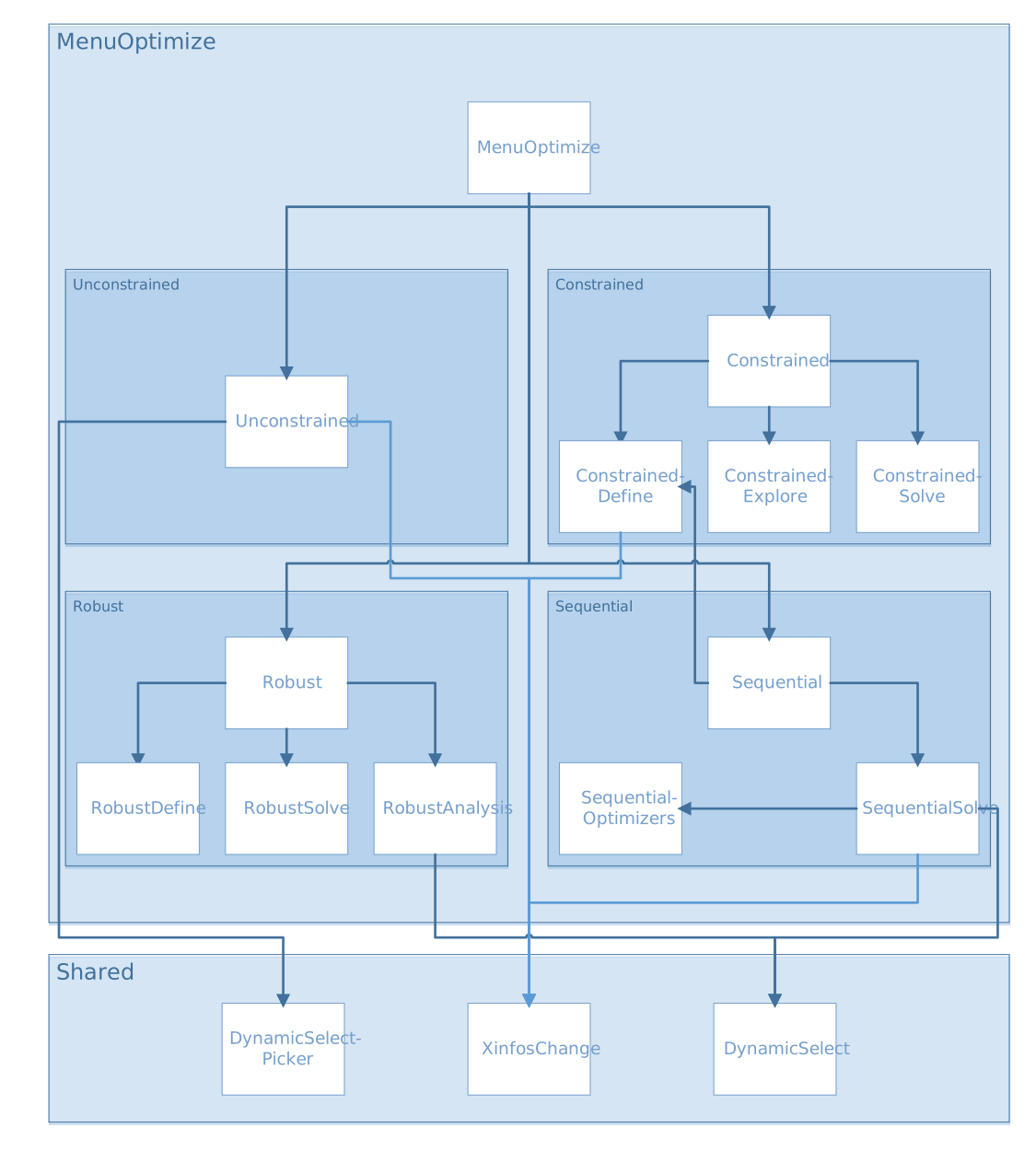
Unconstrained
unconstrained.R
source("modules/shared/XinfosChange.R", local = TRUE)
source("modules/shared/dynamicSelect.R", local = TRUE)
UI and Server functions
- unconstrained.ui(id)
This function populates the Unconstrained Optimization panel
- Parameters:
id (character) – namespace of the module
Main reactives:
chooseY1: objective 1 selection
chooseY2: objective 2 selection
sign1: optimization type selection for objective 1
sign2: optimization type selection for objective 2
goOptim: button to launch optimization
download: button to export optimization results
plotOptim: displays optimization results plot
tableOptim: displays optimization results data as a table
- unconstrained.server(input, output, session, DOE, listmodels, settings, use_simulator)
- Parameters:
input (list-like-object) – stores the widgets’ values.
output (list-like-object) – stores the instructions to build R objects in the app.
session (object) – environment that can be used to access information and functionality relating to the session.
DOE (object) – stores the point values and the DOE information (e.g. bounds…)
listmodels (list) – list of trained models
settings (list-like-object) – variables specified in settingsOptimizations.R
use_simulator (logical) – informs if the user uses a simulator linked to Lagun
- Returns:
extra points in the DOE to confirm unconstrained optimization results
- Return type:
list
Main reactives:
resoptim: stores optimization results and settings
choicesY1: output variable list
choicesY2: output variable list
output$tableOptim: displays optimization results data as a table
output$plotOptim: displays optimization results plot
output$download: downloadable CSV file containing optimization results data
Main functions
- biObjectiveOptim(dimx, DOE, Xinfos, lb, ub, predfun, yname1, sign1, yname2, sign2)
Performs bi-objective optimization using NSGA-II genetic algorithm [1]
- Parameters:
dimx (numeric) – input variable dimension
DOE (object) – stores the point values and the DOE information (e.g. bounds…)
Xinfos (object) – input variable information
lb (numeric) – lower bound
ub (numeric) – upper bound
predfun (function) – predict function of the selected metamodel
yname1 (character) – name of output variable for objective 1
sign1 (character) – optimization type for variable 1 (minimize or maximize)
yname2 (character) – name of output variable for objective 2
sign2 (character) – optimization type for variable 2 (minimize or maximize)
- monoObjectiveOptimWithoutCat(dimx, id, lb, ub, predfun, yname1, sign1, callback, inc, nmultistart)
Performs mono-objective optimization using BFGS algorithm (without categorical variables)
- Parameters:
dimx (numeric) – input variable dimension
id (integer) – output index of objective 1 (yname1)
lb (numeric) – lower bound
ub (numeric) – upper bound
predfun (function) – predict function of the selected metamodel
yname1 (character) – name of output variable for objective 1
sign1 (character) – optimization type for variable 1 (minimize or maximize)
callback (function) – reports progress
inc (numeric) – iteration number for callback
nmultistart (numeric) – number of initialization for multistart optimization
- monoObjectiveOptim(dimx, DOE, Xinfos, lb, ub, predfun, yname1, sign1, callback, nmultistart)
Performs mono-objective optimization using BFGS algorithm (brute force runs of monoObjectiveOptimWithoutCat for all combinations of categorical values)
- Parameters:
dimx (numeric) – input variable dimension
DOE (object) – stores the point values and the DOE information (e.g. bounds…)
Xinfos (object) – input variable information
lb (numeric) – lower bound
ub (numeric) – upper bound
predfun (function) – predict function of the selected metamodel
yname1 (character) – name of output variable for objective 1
sign1 (character) – optimization type for variable 1 (minimize or maximize)
callback (function) – reports progress
nmultistart (numeric) – number of initialization for multistart optimization
Plot functions
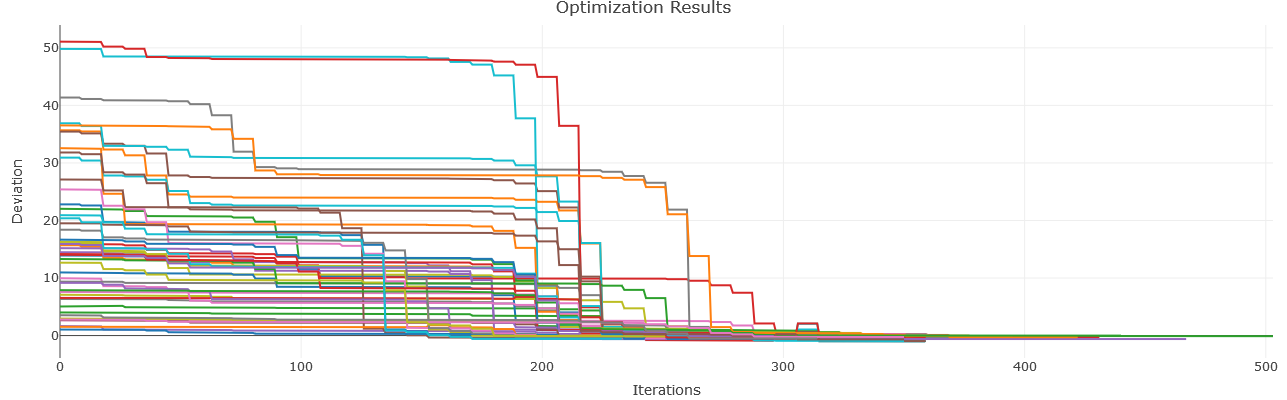
- plotMonoObjectiveOptim(resoptim)
Plots results for mono-objective optimization
- Parameters:
resoptim (list) – optimization results
- plotBiObjectiveOptim(resoptim)
Plots results for bi-objective optimization
- Parameters:
resoptim (list) – optimization results
Secondary functions
- callback(inc, nm)__
Reports progress of a task. Calls R Shiny incProgress
- Parameters:
inc (numeric) – incth iteration
nm (numeric) – nmth initialization
Constrained
constrained.R
source("modules/menuOptimize/constrained/constrainedDefine.R", local = TRUE)
source("modules/menuOptimize/constrained/constrainedSolve.R", local = TRUE)
source("modules/menuOptimize/constrained/constrainedExplore.R", local = TRUE)
UI and Server functions
- constrained.ui(id)
Populates the Constrained Optimization panel with three subpanels:
Define Optimization Problem
Solve Optimization Problem
Explore Solution(s)
- Parameters:
id (character) – namespace of the module
Main reactives:
Calls
constrainedDefine.ui()with id constrainedDefineCalls
constrainedSolve.ui()with id constrainedSolveCalls
constrainedExplore.ui()with id constrainedExplore
- constrained.server(input, output, session, DOE, listmodels, settings, use_simulator)
- Parameters:
input (list-like-object) – stores the widgets’ values.
output (list-like-object) – stores the instructions to build R objects in the app.
session (object) – environment that can be used to access information and functionality relating to the session.
DOE (object) – stores the point values and the DOE information (e.g. bounds…)
listmodels (list) – list of trained models
settings (list-like-object) – variables specified in settingsOptimizations.R
use_simulator (logical) – informs if the user uses a simulator linked to Lagun
- Returns:
extra points in the DOE to confirm constrained optimization results
- Return type:
list
Main reactives:
Calls
constrainedDefine.server()with id constrainedDefineCalls
constrainedSolve.server()with id constrainedSolveCalls
constrainedExplore.server()with id constrainedExplore
constrainedDefine.R
source("modules/shared/XinfosChange.R", local = TRUE)
UI and Server functions
- constrainedDefine.ui(id)
Populates the Define Optimization Problem subpanel
- Parameters:
id (character) – namespace of the module
Main reactives:
optimdef: button to define the problem formulation, opens modal window containing:
file: file input to upload the problem formulation
obj1.ui, obj2.ui: objective selection (output variables)
signobj1.ui, signobj2.ui: optimization type selection
nbcons.ui: input for the number of constraints
listconstraints.ui: list of defined contraints
saveoptimdef: button to save and close
closeoptimdef: button to cancel problem formulation
downloadformulation: button to export problem formulation
XinfosChange.ui(ns(“bounds”)): button to change input information
XinfosChange.ui.preview(ns(“bounds”)): displays table to preview input information
thresholds: displays thresholds as a table
optimTypes: displays optimization types as a table
- constrainedDefine.server(input, output, session, DOE, listmodels, nbcons.min = 1, nbobj = 1, simulations = NULL)
- Parameters:
input (list-like-object) – stores the widgets’ values.
output (list-like-object) – stores the instructions to build R objects in the app.
session (object) – environment that can be used to access information and functionality relating to the session.
DOE (object) – stores the point values and the DOE information (e.g. bounds…)
listmodels (list) – list of trained models
nbcons.min (numeric) – minimum number of contraints (default=1)
nbobj (numeric) – number of objectives (default=1)
simulations (object) – simulations if a simulator is connected to Lagun (default=NULL)
Main reactives:
COformulation: contains constraint formulation
choicesY, choicesY2: contains output variables
output$obj1.ui, output$obj2.ui: selected optimization objectives
output$signobj1.ui, output$signobj2.ui: selected optimization types
output$nbcons.ui: number of constraints input
output$listconstraints.ui: UI containing the defined constraints
output$thresholds: table containing thresholds
output$optimTypes: table containing optimization types
output$downloadformulation: downloadable TXT file containing constraint formulation
Main functions
- getCOformulationThresholds(COformulation, ynames)
Returns a matrix with the threshold for each output
- Parameters:
COformulation (list) – constraint formulation
ynames (list) – output variable names
- getCOformulationOptimTypes(COformulation, ynames)
Returns a matrix with optimization type for each output
- Parameters:
COformulation (list) – constraint formulation
ynames (list) – output variable names
- getCOformulation(dinit, ynames)
Returns constraint formulation with thresholds and optimization types. Calls
getCOformulationThresholdsandgetCOformulationOptimTypes- Parameters:
dinit (list) – intial constraint formulation
ynames (list) – output variable names
- check.CO.formulation(dinit, ynames, nbobj)
Checks if contraint formulation is valid
- Parameters:
dinit (list) – intial constraint formulation
ynames (list) – output variable names
nbobj (numeric) – number of objectives
constrainedSolve.R
UI and Server functions
- constrainedSolve.ui(id)
Populates the Solve Optimization Problem panel
- Parameters:
id (character) – namespace of the module
Main reactives:
go: button to launch optimization
OptimFailed: display choice if no optimum satisfying all constraints is found
download: button to export optimization results
- Graphical Representation:
plotObj: displays objective plot
plotConstr: displays constraint plot
- Table Representation:
table: displays optimization results as a table
- constrainedSolve.server(input, output, session, DOE, listmodels, Xinfos, COformulation, settings, use_simulator)
- Parameters:
input (list-like-object) – stores the widgets’ values.
output (list-like-object) – stores the instructions to build R objects in the app.
session (object) – environment that can be used to access information and functionality relating to the session.
DOE (object) – stores the point values and the DOE information (e.g. bounds…)
listmodels (list) – list of trained models
Xinfos (object) – input variable information
COformulation (list) – constraint formulation
settings (list-like-object) – variables specified in settingsOptimizations.R
use_simulator (logical) – informs if the user uses a simulator linked to Lagun
- Returns:
resCoptim & simulations
- Return type:
list
Main reactives:
resCoptim: contains constrained optimization results
simulations: contains extra points in the DOE to confirm constrained optimization results
output$plotObj: displays objective plot
output$plotConstr: displays constraint plot
output$table: displays optimization results as a table
output$download: downloadable CSV file containing constrained optimization results
Main functions
- computeConstrainedOptimWithoutCat(dimx, lb, ub, predfun, COformulation, COalgo, inc, nmultistart, callback)
Performs constrained optimization without categorical variables, using one of the following methods:
- Parameters:
dimx (numeric) – input variable dimension
lb (numeric) – lower bound
ub (numeric) – upper bound
predfun (function) – predict function of the selected metamodel
COformulation (list) – constraint formulation
COalgo (character) – constrained optimization algorithm
inc (numeric) – iteration number
nmultistart (numeric) – number of initialization for multistart optimization
callback (function) – reports progress
- computeConstrainedBiOptimWithoutCat(dimx, lb, ub, predfun, COformulation)
Performs constrained bi-objective optimization without categorical variables using NSGA-II genetic algorithm [1]
- Parameters:
dimx (numeric) – input variable dimension
lb (numeric) – lower bound
ub (numeric) – upper bound
predfun (function) – predict function of the selected metamodel
COformulation (list) – constraint formulation
- computeConstrainedOptim(dimx, DOE, Xinfos, lb, ub, predfun, COformulation, COalgo, nmultistart, callback)
Performs constrained optimization calling computeConstrainedOptimWithoutCat (iteratively if some inputs are categorical to explore all combinations)
- Parameters:
dimx (numeric) – input variable dimension
DOE (object) – stores the point values and the DOE information (e.g. bounds…)
Xinfos (object) – input variable information
lb (numeric) – lower bound
ub (numeric) – upper bound
predfun (function) – predict function of the selected metamodel
COformulation (list) – constraint formulation
COalgo (character) – constrained optimization algorithm
nmultistart (numeric) – number of initialization for multistart optimization
callback (function) – reports progress
- computeConstrainedBiOptim(dimx, DOE, Xinfos, lb, ub, predfun, COformulation, callback)
Performs constrained bi-objective optimization calling computeConstrainedBiOptimWithoutCat (iteratively if some inputs are categorical to explore all combinations)
- Parameters:
dimx (numeric) – input variable dimension
DOE (object) – stores the point values and the DOE information (e.g. bounds…)
Xinfos (object) – input variable information
lb (numeric) – lower bound
ub (numeric) – upper bound
predfun (function) – predict function of the selected metamodel
COformulation (list) – constraint formulation
callback (function) – reports progress
Plot functions
- plotConstrainedOptimBiObj(DOE, COformulation, resCoptim)
Plots bi-objective optimization results
- Parameters:
DOE (object) – stores the point values and the DOE information (e.g. bounds…)
COformulation (list) – constraint formulation
resCoptim (list) – constrained optimization results
- plotConstrainedOptimObj(DOE, COformulation, resCoptim)
Plots optimization results
- Parameters:
DOE (object) – stores the point values and the DOE information (e.g. bounds…)
COformulation (list) – constraint formulation
resCoptim (list) – constrained optimization results
- plotConstrainedOptimConstr(DOE, COformulation, resCoptim)
Plots optimization constraint satisfaction
- Parameters:
DOE (object) – stores the point values and the DOE information (e.g. bounds…)
COformulation (list) – constraint formulation
resCoptim (list) – constrained optimization results
Secondary functions
- get.resCoptim.table(DOE, COformulation, resCoptim, choiceOptimFailed)
Shapes optimization results as a data.frame
- Parameters:
DOE (object) – stores the point values and the DOE information (e.g. bounds…)
COformulation (list) – constraint formulation
resCoptim (list) – constrained optimization results
choiceOptimFailed (character) – choice to display if no optimum satisfying all constraints was found
- get.resCoptim.export(DOE, COformulation, resCoptim, choiceOptimFailed)
Shapes optimization results as a data.frame for file export
- Parameters:
DOE (object) – stores the point values and the DOE information (e.g. bounds…)
COformulation (list) – constraint formulation
resCoptim (list) – constrained optimization results
choiceOptimFailed (character) – choice to display if no optimum satisfying all constraints was found
- callback(inc, i)__
Reports progress of a task. Calls R Shiny incProgress
- Parameters:
inc (numeric) – incth iteration
i (numeric) – ith initialization (multistart)
constrainedExplore.R
UI and Server functions
- constrainedExplore.ui(id)
Populates the Explore Solution(s) panel
- Parameters:
id (character) – namespace of the module
Main reactives:
parcoords: parallel plot
- constrainedExplore.server(input, output, session, DOE, listmodels, COformulation, resCoptim, settings)
- Parameters:
input (list-like-object) – stores the widgets’ values.
output (list-like-object) – stores the instructions to build R objects in the app.
session (object) – environment that can be used to access information and functionality relating to the session.
DOE (object) – stores the point values and the DOE information (e.g. bounds…)
listmodels (list) – list of trained models
COformulation (list) – constraint formulation
resCoptim (list) – constrained optimization results
settings (list-like-object) – variables specified in settingsOptimizations.R
Main reactives:
Yinfos: contains the output variable information
output$parcoords: displays the parallel plot
Main functions
Plot functions
Secondary functions
- getParcoordsCOExplo(DOE, predfun, lb, ub, COformulation, resCoptim, Yinfos, nobsparcoords)
Builds a parallel plot of the constrained optimization
- Parameters:
DOE (object) – stores the point values and the DOE information (e.g. bounds…)
predfun (function) – predict function of the selected metamodel
lb (numeric) – lower bound
ub (numeric) – upper bound
COformulation (list) – constraint formulation
resCoptim (list) – constrained optimization results
Yinfos (object) – output variable information
nobsparcoords (numeric) – number of observations
Sequential
sequential.R
source("modules/menuOptimize/constrained/constrainedDefine.R", local = TRUE)
source("modules/menuOptimize/sequential/sequentialSolve.R", local = TRUE)
UI and Server functions
- sequential.ui(id)
Builds the Sequential Optimization with Surrogate Model page with two panels:
Define Optimization Problem
Solve Optimization Problem
- Parameters:
id (character) – namespace of the module
Details
calls
constrainedDefine.ui()with id sequentialDefinecalls
sequentialSolve.ui()with id sequentialSolve
- sequential.server(input, output, session, DOE, listmodels, advance.importDOE, settings)
- Parameters:
input (list-like-object) – stores the widgets’ values.
output (list-like-object) – stores the instructions to build R objects in the app.
session (object) – environment that can be used to access information and functionality relating to the session.
DOE (object) – stores the point values and the DOE information (e.g. bounds…)
listmodels (list) – list of trained models
advance.importDOE (object) – stores the simulation information status (completed/waiting/running) when Lagun is connected to an external simulator
settings (list-like-object) – variables specified in settingsOptimizations.R
Details
calls
constrainedDefine.server()with id sequentialDefinecalls
sequentialSolve.server()with id sequentialSolve
sequentialOptimizers.R
Main functions
- available.seq.optimizers()
Returns available sequential optimizers
- acquisition.function(dimx, objs, minimize, idconstr, boundsO, boundsC, sdreweightedloo=FALSE)
Builds function to compute a criterion according to the constraints and the optimization type
- Parameters:
dimx (numeric) – input variable dimension
objs (object) – trained metamodels and their information
minimize (logical) – informs whether the optimization type is a minimization
idconstr (character) – variables on which a constraint is applied, if any
boundsO (list) – objective bounds
boundsC (list) – constraint bounds
sdreweightedloo (logical) – indicates whether the standard deviation should be weighted by the error (default=FALSE)
- acquisition.function.MO(dimx, objs, minimize, idconstr, boundsO, boundsC, sdreweightedloo=FALSE)
Same as
acquisition.function()but for MO algorithm- Parameters:
dimx (numeric) – input variable dimension
objs (object) – trained metamodels and their information
minimize (logical) – informs whether the optimization type is “minimize”
idconstr (character) – variables on which a constraint is applied, if any
boundsO (list) – objective bounds
boundsC (list) – constraint bounds
sdreweightedloo (logical) – indicates whether the standard deviation should be weighted by the error (default=FALSE)
- EGO.seq.optimize(models, Xinfos, DOE, npts = 1, idobj = 1, minimize=TRUE, idconstr=NULL, boundsO, boundsC, settings)
Performs EGO sequential optimization
- Parameters:
models (list) – list of trained metamodels
Xinfos (object) – input variable information
DOE (object) – stores the point values and the DOE information (e.g. bounds…)
npts (numeric) – number of points / observations (default=1)
idobj (numeric) – model ID (default=1)
minimize (logical) – informs whether the optimization type is “minimize” (default=TRUE)
idconstr (character) – variables on which a constraint is applied, if any (default=NULL)
boundsO (list) – objective bounds
boundsC (list) – constraint bounds
settings (list-like-object) – variables specified in settingsOptimizations.R
- EGO.seq.settings()
Retruns EGO optimizer settings
- RS.seq.optimize(models, Xinfos, DOE, npts=1, idobj=1, minimize=TRUE, idconstr=NULL, boundsO=NULL, boundsC=NULL, settings=NULL)
Performs RS sequential optimization
- Parameters:
models (list) – list of trained metamodels
Xinfos (object) – input variable information
DOE (object) – stores the point values and the DOE information (e.g. bounds…)
npts (numeric) – number of points / observations (default=1)
idobj (numeric) – model ID (default=1)
minimize (logical) – informs whether the optimization type is “minimize” (default=TRUE)
idconstr (character) – variables on which a constraint is applied, if any (default=NULL)
boundsO (list) – objective bounds (default=NULL)
boundsC (list) – constraint bounds (default=NULL)
settings (list-like-object) – variables specified in settingsOptimizations.R (default=NULL)
- RS.seq.settings()
Retruns RS optimizer settings
sequentialSolve.R
source("modules/shared/XinfosChange.R", local = TRUE)
source("modules/shared/dynamicSelect.R", local = TRUE)
source("modules/menuOptimize/sequential/sequentialOptimizers.R", local = TRUE)
UI and Server functions
- sequentialSolve.ui(id)
Populates the panel Solve Optimization Problem
- Parameters:
id (character) – namespace of the module
Details
chooseOptimAlgo: optimization algorithm selection
nitermax: input to define the number max of iteration
nptsiter: input to define the number of points per iteration
optimsettings: button to display advanced settings
settings.dynui: displays advanced settings
launchButtonUI: button to launch optimization
stopOptim: button to stop optimization
restartOptim: button to restart optimization
settings.dynui: button to display advanced optimizer settings
studyIter: button to display iteration analysis
sliderIter.dynui: slider to choose iteration to analyze
plotRadar: Constraint Visualization: DOE quantiles, thresholds and current iteration
Xaddcontents: displays input variables selected iterations as a table
rowvisu.dynui: displays optimization results plot, constraints heatplot, Q2 plot
- sequentialSolve.server(input, output, session, DOE, listmodels, Xinfos, COformulation, advance.importDOE, settings)
- Parameters:
input (list-like-object) – stores the widgets’ values.
output (list-like-object) – stores the instructions to build R objects in the app.
session (object) – environment that can be used to access information and functionality relating to the session.
DOE (object) – stores the point values and the DOE information (e.g. bounds…)
listmodels (list) – list of trained models
Xinfos (object) – input variable information
COformulation (list) – constraint formulation
advance.importDOE (object) – stores the simulation information status (completed/waiting/running) when Lagun is connected to an external simulator
settings (list-like-object) – variables specified in settingsOptimizations.R
Details
choicesOptimAlgo: optimization algorithm selection
output$launchButtonUI: button to launch optimization
output$sliderIter.dynui: slider input fir iteration number selection
output$plotRadar: displays radar plot
output$Xaddcontents: builds table with input variables selected iterations
output$rowvisu.dynui: displays optimization results plot, constraints heatplot, Q2 plot
output$plotObj: builds optimization results plot
output$plotConstr: builds constraints heatplot
output$plotQ2: builds Q2 plot
Plot functions
- update.plots.pred(DOE, COformulation, seq, simulations, nitermax, session, npts)
Updates plots with outputs that are compliant with the contraints when a simulator is used
- Parameters:
DOE (object) – stores the point values and the DOE information (e.g. bounds…)
COformulation (list) – constraint formulation
seq (object) – contains sequential optimization data and results
simulations (object) – simulations if a simulator is connected to Lagun
nitermax (numeric) – number max of iterations
session (object) – environment that can be used to access information and functionality related to the session
npts (numeric) – number of points per iteration
- update.plots(DOE, COformulation, seq, simulations, nitermax, session, npts)
Updates plots with outputs that are compliant with the contraints
- Parameters:
DOE (object) – stores the point values and the DOE information (e.g. bounds…)
COformulation (list) – constraint formulation
seq (object) – contains sequential optimization data and results
simulations (object) – simulations if a simulator is connected to Lagun
nitermax (numeric) – number max of iterations
session (object) – environment that can be used to access information and functionality related to the session
npts (numeric) – number of points per iteration
Secondary functions
- respect.constraints(Y, signconstr, thconstr)
Checks if the outputs are compliant with the contraints
- Parameters:
Y (list) – output variable list
signconstr (numeric) – optimization type / sign (-1 or 1)
thconstr (numeric) – constraint threshold
- getlbub(signs, thresholds)
Returns lower-bounds and upper-bounds of the threshold vector
- Parameters:
signs (numeric) – optimization type / sign (-1 or 1)
thconstr (numeric) – constraint threshold
Robust
robust.R
source("modules/menuOptimize/robust/robustDefine.R", local = TRUE)
source("modules/menuOptimize/robust/robustAnalysis.R", local = TRUE)
source("modules/menuOptimize/robust/robustSolve.R", local = TRUE)
UI and Server functions
- robust.ui(id)
Builds the Robust Optimization with Surrogate Model page with two panels:
Define Optimization Problem
Preliminary Analysis
Solve Problem
- Parameters:
id (character) – namespace of the module
Details
calls
robustDefine.ui()with id robustDefinecalls
robustAnalysis.ui()with id robustAnalysiscalls
robustSolve.ui()with id robustSolve
- robust.server(input, output, session, DOE, listmodels, settings)
- Parameters:
input (list-like-object) – stores the widgets’ values.
output (list-like-object) – stores the instructions to build R objects in the app.
session (object) – environment that can be used to access information and functionality relating to the session.
DOE (object) – stores the point values and the DOE information (e.g. bounds…)
listmodels (list) – list of trained models
settings (list-like-object) – variables specified in settingsOptimizations.R
Details
calls
robustDefine.server()with id robustDefinecalls
robustAnalysis.server()with id robustAnalysiscalls
robustSolve.server()with id robustSolve
Secondary functions
- q10(v)
Returns 10% quantile
- Parameters:
v (vector) – data vector of numerical values
- q90(v)
Returns 90% quantile
- Parameters:
v (vector) – data vector of numerical values
robustDefine.R
UI and Server functions
- robustDefine.ui(id)
Populates the panel Define Optimization Problem
- Parameters:
id (character) – namespace of the module
Details
design: table containing formulation design
thresholds: table containing formulation thresholds
optimTypes: table containing formulation optimization types
- robustDefine.server(input, output, session, DOE)
- Parameters:
input (list-like-object) – stores the widgets’ values.
output (list-like-object) – stores the instructions to build R objects in the app.
session (object) – environment that can be used to access information and functionality relating to the session.
DOE (object) – stores the point values and the DOE information (e.g. bounds…)
Details
ROformulation: contains formulation information
output$error.file: errors returned by
check.RO.formulation()if anyoutput$design: builds table containing formulation design
output$thresholds: builds table containing formulation thresholds
output$optimTypes: builds table containing formulation optimization types
Main functions
- getROformulationDesign(DOE, ROformulation)
Returns formulation design (variable type, mean, standard deviation) as a data.frame
- Parameters:
DOE (object) – stores the point values and the DOE information (e.g. bounds…)
ROformulation (list) – Robust Optimization formulation
- getROformulationThresholds(DOE, ROformulation)
Returns formulation thresholds
- Parameters:
DOE (object) – stores the point values and the DOE information (e.g. bounds…)
ROformulation (list) – Robust Optimization formulation
- getROformulationOptimTypes(DOE, ROformulation)
Returns formulation optimization types
- Parameters:
DOE (object) – stores the point values and the DOE information (e.g. bounds…)
ROformulation (list) – Robust Optimization formulation
- getROformulation(dinit, DOE)
Returns the complete formulation using the functions above.
- Parameters:
dinit (object) – content of the input file
DOE (object) – stores the point values and the DOE information (e.g. bounds…)
Secondary functions
- check.RO.formulation(dinit, nX, nY)
Checks if content of the input file is valid
- Parameters:
dinit (object) – content of the input file
nX (numeric) – number of inputs
nY (numeric) – number of outputs
robustAnalysis.R
source("modules/shared/dynamicSelect.R", local = TRUE)
UI and Server functions
- robustAnalysis.ui(id)
Populates the panel Preliminary Analysis
- Parameters:
id (character) – namespace of the module
Details
chooseY: output variable selection
contentC: displays estimation of problem complexity
plotpairPrelimIndiv: pairplot to check the probability of respecting the selected constraint
plotpairPrelimJoint: pairplot to check the probability of respecting all constraints simultaneously
plotPrelimC: plots constraint satisfaction probability
- robustAnalysis.server(input, output, session, DOE, listmodels, ROformulation)
- Parameters:
input (list-like-object) – stores the widgets’ values.
output (list-like-object) – stores the instructions to build R objects in the app.
session (object) – environment that can be used to access information and functionality relating to the session.
DOE (object) – stores the point values and the DOE information (e.g. bounds…)
listmodels (list) – list of trained models
ROformulation (list) – Robust Optimization formulation
Main reactives:
choicesY: output variable selection
resPrelimC: preliminary constraint evaluation
output$contentC: estimation of problem complexity as a table
output$plotPrelimC: plots constraint satisfaction probability
output$plotpairPrelimIndiv: plots probability of respecting the selected constraint
output$plotpairPrelimJoint: plots probability of respecting all constraint
Main functions
- getResPrelimC.proba(DOE, ROformulation, resPrelimC)
Computes percentage of tested points whose probability to respect the constraint is greater than a control level of 0.9, 0.95 and 0.99.
- Parameters:
DOE (object) – stores the point values and the DOE information (e.g. bounds…)
ROformulation (list) – Robust Optimization formulation
resPrelimC (list) – preliminary constraint evaluation
- evaluateConstraints(DOE, lb, ub, predfun, ROformulation, nlhs, callback)
Generates a Monte Carlo random sample and evaluates which points satisfy the defined constraints
- Parameters:
DOE (object) – stores the point values and the DOE information (e.g. bounds…)
lb (numeric) – lower bound
ub (numeric) – upper bound
predfun (function) – predict function of the selected metamodel
ROformulation (list) – Robust Optimization formulation
nlhs (numeric) – number of points
callback (function) – reports progress
Plot functions
- plotPrelimC(DOE, ROformulation, resPrelimC, yname)
Plots constraint satisfaction probability
- Parameters:
DOE (object) – stores the point values and the DOE information (e.g. bounds…)
ROformulation (list) – Robust Optimization formulation
resPrelimC (list) – preliminary constraint evaluation
yname (character) – output variable name
- plotpairPrelimIndiv(DOE, ROformulation, resPrelimC, yname)
Plots a pairplot to check the probability of respecting the selected constraint
- Parameters:
DOE (object) – stores the point values and the DOE information (e.g. bounds…)
ROformulation (list) – Robust Optimization formulation
resPrelimC (list) – preliminary constraint evaluation
yname (character) – output variable name
- plotpairPrelimJoint(DOE, ROformulation, resPrelimC, yname)
Plots a pairplot to check the probability of respecting all constraints simultaneously
- Parameters:
DOE (object) – stores the point values and the DOE information (e.g. bounds…)
ROformulation (list) – Robust Optimization formulation
resPrelimC (list) – preliminary constraint evaluation
yname (character) – output variable name
Secondary functions
- callback(i)__
Reports progress of a task. Calls R Shiny incProgress
- Parameters:
i (numeric) – ith iteration
robustSolve.R
UI and Server functions
- robustSolve.ui(id)
Populates the panel Solve Problem
- Parameters:
id (character) – namespace of the module
Details
go: button to launch robust optimization
ROcrit: robust optimization criterion selection
threshproba: constraint probability selection
download: button to export optimization results
- robustSolve.server(input, output, session, DOE, listmodels, ROformulation, settings)
- Parameters:
input (list-like-object) – stores the widgets’ values.
output (list-like-object) – stores the instructions to build R objects in the app.
session (object) – environment that can be used to access information and functionality relating to the session.
DOE (object) – stores the point values and the DOE information (e.g. bounds…)
listmodels (list) – list of trained models
ROformulation (list) – Robust Optimization formulation
settings (list-like-object) – variables specified in settingsOptimizations.R
Details
resRoptim: contains optimization information and results
output$plot: displays plot of optimization results
output$table: displays table of optimization results
output$download: downloadble CSV file containing optimization results
Main functions
- get.resRoptim.table(DOE, ROformulation, resRoptim, ROcrit)
Shapes optimization results as a data.frame
- Parameters:
DOE (object) – stores the point values and the DOE information (e.g. bounds…)
ROformulation (list) – Robust Optimization formulation
resRoptim (object) – optimization results
ROcrit (character) – robust optimization criterion
- get.resRoptim.export(DOE, ROformulation, resRoptim)
Shapes optimization results as a data.frame for file export
- Parameters:
DOE (object) – stores the point values and the DOE information (e.g. bounds…)
ROformulation (list) – Robust Optimization formulation
resRoptim (object) – optimization results
- computeRobustOptim(DOE, lb, ub, predfun, ROformulation, threshold, ROalgo, ROcrit, nmultistart, callback)
Performs robust optimization using one of the following methods:
- Parameters:
DOE (object) – stores the point values and the DOE information (e.g. bounds…)
lb (numeric) – lower bound
ub (numeric) – upper bound
predfun (function) – predict function of the selected metamodel
ROformulation (list) – Robust Optimization formulation
threshold (numeric) – threshold, constraint probability
ROalgo (character) – optimization algorithm
ROcrit (character) – optimization criterion (mean, quantile 10%, quantile 90%)
nmultistart (numeric) – number of initialization for multistart optimization
callback (function) – reports progress
Plot functions
- plotRobustOptim(DOE, ROformulation, resRoptim)
Plots robust optimization results
- Parameters:
DOE (object) – stores the point values and the DOE information (e.g. bounds…)
ROformulation (list) – Robust Optimization formulation
resRoptim (object) – optimization results
Secondary functions
- callback(i)__
Reports progress of a task. Calls R Shiny incProgress
- Parameters:
i (numeric) – ith iteration