Surrogate
Tutorial
Surrogate Models |
|

Architecture
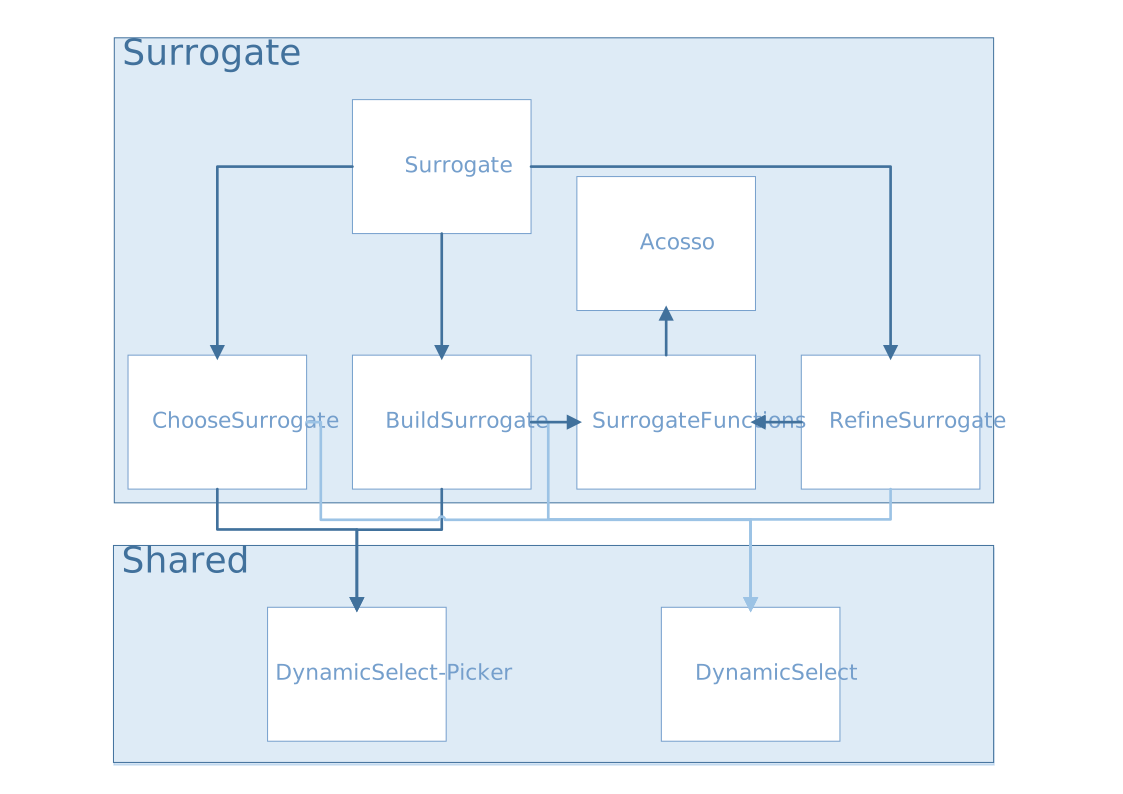
surrogate.R
source("modules/surrogate/buildsurrogate.R", local = TRUE)
source("modules/surrogate/choosesurrogate.R", local = TRUE)
source("modules/surrogate/refinesurrogate.R", local = TRUE)
UI and Server functions
- surrogate.ui(id)
This function creates the surrogate model page with three panels:
Build Surrogate Models
Select Final Surrogate Models
Additional Simulations to Refine Surrogate Models
- Parameters:
id (character) – namespace of the module
Main reactives:
modalViewDOEsurrogate: calls a modal view to display table of the current DOE
buildsurrogate: populates the Build Surrogate Models panel
choosesurrogate: populates the Select Final Surrogate Models panel
refinesurrogate: populates the Additional Simulations to Refine Surrogate Models panel
- surrogate.server(input, output, session, DOE, settings, use_simulator, surrogate.clicked, advance.importDOE)
- Parameters:
input (list-like-object) – stores the widgets’ values.
output (list-like-object) – stores the instructions to build R objects in the app.
session (object) – environment that can be used to access information and functionality relating to the session.
DOE (object) – stores the point values and the DOE information (e.g. bounds…)
settings (list-like-object) – variables specified in settingsSurrogate.R
use_simulator (logical) – informs if the user uses a simulator linked to Lagun
surrogate.clicked (logical) – informs whether the user selected the surrogate model tab
advance.importDOE (object) – stores the simulation information status (completed/waiting/running) when Lagun is connected to an external simulator
Main reactives:
currentDOE: reactive expression containing the DOE definition
listmodels: contains the model information
output$DTcurrentDOEsurrogate: displays currentDOE inputs and outputs as a table
calls modules buildsurrogate choosesurrogate and refinesurrogate
surrogate_functions.R
source('modules/surrogate/acosso.R', local = TRUE)
Main functions
- build.metamodel(X, Y, Ytype='numeric', type.metamodel="Lasso", categorical=NULL, levels=NULL, acosso2.selvar=NULL, kriging.trend="Constant", kriging.cov=c("Matern32", "Matern52", "Gauss"), kriging.selvar=NULL, kriging.nugget=FALSE, kriging.estim="MLE", kriging.multi=FALSE, trendobj=NULL, tag.failY="NA")
This function builds a metamodel among the following:
- Parameters:
X (data.frame) – input data
Y (data.frame) – output data
Ytype (character) – output type (numeric or categorical)
type.metamodel (character) – type of metamodel to (default=”Lasso”)
categorical (list) – index list of the categorical variables if any (default=NULL)
levels (list) – levels of the categorical variable indices if any (default=NULL)
acosso2.selvar (list) – index list of selected variables to build the metamodel of type ACOSSO 2 (default=NULL)
kriging.trend (character) – specifies the trend of the kriging model (default=”Constant”)
kriging.cov (character) – covariance structure to be used (by default Matern32, Matern52, and Gauss are tested and the best is selected)
kriging.selvar (list) – index list of selected variables to build the Kriging metamodel (default=NULL)
kriging.nugget (logical) – indicates whether the nugget effect should be estimated (default=FALSE)
kriging.estim (string) – method by which unknown parameters are estimated (default=”MLE”, Maximum Likelihood)
kriging.multi (logical) – indicates whether the multiple optimizations should be performed (default=FALSE)
trendobj (object) – contains the metamodel specified by kriging.trend (default=NULL)
tag.failY (character) – character by which missing values are specified (default=”NA”)
- predict.metamodel(obj, Xnew, computesd=TRUE, sdreweightedloo=FALSE)
Predicts the outputs for new observations with a trained metamodel
- Parameters:
obj (object) – contains the built metamodel
Xnew (data.frame) – contains the input points to perform prediction
computesd (logical) – indicates the whether the standard deviation should be computed (default=TRUE)
sdreweightedloo (logical) – indicates whether the standard deviation should be weighted by the error (default=FALSE)
- update.metamodel(obj, Xadd, Yadd)
Updates an existing metamodel with extra data points
- Parameters:
obj (object) – contains the built metamodel
Xadd (data.frame) – contains the extra input points to refine the existing model
Yadd (data.frame) – contains the extra output points to refine the existing model
- onestep.improve.metamodel(objs, Xtotest, criterion='mse', Xint=NULL, target=0, idconstr=NULL, signconstr=NULL, thconstr=NULL)
Selects the best points in Xtotest using the choosen criterion in order to refine the model.
The criterions are choosen among the following:
mse: Mean Squared Error
imse: Integrated Mean Squared Error
ego.min, ego.max: Efficient Global Optimization
efi.min, efi.max: Expected Feasible Improvement
ranjan
local_categorical
- Parameters:
objs (object) – contains the metamodels
Xtotest (data.frame) – contains input points to test
criterion (character) – specifies the metric that should be used to identify next point to compute (default=”mse”)
Xint (data.frame) – contains the input points to perform prediction (default=NULL)
target (numeric) – target variable (default=0)
idconstr (numeric) – output id on which to apply constraint (default=NULL)
signconstr (numeric) – -1 or 1, defines the sign of the constraint(default=NULL)
thconstr (numeric) – threshold constraint (default=NULL)
- fit.krigeage.classif(Xmodel, Y)
Fits a classification kriging model
- Parameters:
Xmodel (data.frame) – input training data
Y (data.frame) – output training classes
acosso.R
The source file acosso.R [2] (provided online) documents every function. Please refer to it for further information.
buildsurrogate.R
source("modules/shared/dynamicSelect.R", local = TRUE)
source("modules/shared/dynamicSelectpicker.R", local = TRUE)
source('modules/surrogate/surrogate_functions.R', local = TRUE)
UI and Server functions
- buildsurrogate.ui(id)
This function populates the Build Surrogate Models panel
- Parameters:
id (character) – namespace of the module
Main reactives:
surrogatemode: mode selection (normal or expert)
buildacosso1: button to train acosso1 model
buildacosso2: button to train acosso2 model
buildkriging: button to train kriging model
buildlasso: button to train lasso model
retrain: switch to allow re-training of the models
tableQ2: table containing models with the computed Q2
- buildsurrogate.server(input, output, session, DOE, listmodels, settings, surrogate.clicked)
- Parameters:
input (list-like-object) – stores the widgets’ values.
output (list-like-object) – stores the instructions to build R objects in the app.
session (object) – environment that can be used to access information and functionality related to the session.
DOE (object) – stores the point values and the DOE information (e.g. bounds…)
listmodels (list) – list of trained models
settings (list-like-object) – variables specified in settingsSurrogate.R
surrogate.clicked (logical) – informs whether the user selected the surrogate model tab
Main reactives:
whatwastrained: stores which metamodels for which outputs have been trained
askedtrained: stores the user’s asks
choicesQ2validation: selection list for validation criterion
acosso1settings: button to parameter acosso1 model and launch training
acosso2settings: button to parameter acosso2 model and launch training
krigingsettings: button to parameter kriging model and launch training
output$tableQ2: displays Q2 table
output$ui.Q2visu: displays Q2 plot
output$plotQ2: builds Q2 plot
Main functions
- updatebestselected(listmodels, type)
Selects among the trained models, the one with the highest accuracy (one model for each output)
- Parameters:
listmodels (list) – list of trained models
type (character) – validation criterion
- computeQ2test(ypredtest, ytest)
Computes the validation criterion, using Leave-One-Out method. A fast algorithm is used for estimation.
- Parameters:
ypredtest (vector) – predicted output values
ytest (vector) – true output values
- compute.lasso.model(DOE, idY, categorical, levels, callback)
Builds Lasso metamodel
- Parameters:
DOE (object) – stores the point values and the DOE information (e.g. bounds…)
idY (list) – indices of outputs to consider
categorical (list) – indices of categorical variables
levels (list) – levels of the categorical variables
callback (function) – reports progress
- compute.acosso.model(DOE, idY, order, categorical, levels, vars=NULL, callback)
Builds Acosso metamodel
- Parameters:
DOE (object) – stores the point values and the DOE information (e.g. bounds…)
idY (list) – indices of outputs to consider
order (numeric) – 1 or 2, selects acosso 1st or 2nd order
categorical (list) – indices of categorical variables
levels (list) – levels of the categorical variables
vars (list) – selected variables to build the metamodel (default=NULL)
callback (function) – reports progress
- compute.kriging.model(DOE, idY, categorical, levels, vars, trend, trendobj, interpolate, multi, callback)
Builds Kriging metamodel
- Parameters:
DOE (object) – stores the point values and the DOE information (e.g. bounds…)
idY (list) – indices of outputs to consider
categorical (list) – indices of categorical variables
levels (list) – levels of the categorical variables
vars (list) – selected variables to build the metamodel
trend (character) – specifies the trend of the kriging model
trendobj (object) – contains the metamodel specified by kriging.trend
interpolate (logical) – use interpolation (model error is null for training set)
multi (logical) – indicates whether the multiple optimizations should be performed
callback (function) – reports progress
Secondary functions
- callback(i)__
Reports progress of a task. Calls R Shiny incProgress
- Parameters:
i (numeric) – ith iteration
choosesurrogate.R
UI and Server functions
- choosesurrogate.ui(id)
This function populates the Select Final Surrogate Models panel
- Parameters:
id (character) – namespace of the module
Main reactives:
chooseSelCrit: validation criterion selection
chooseSurrogate: panel allowing to select the surrogate model and check its quality
- choosesurrogate.server(input, output, session, DOE, listmodels, settings)
- Parameters:
input (list-like-object) – stores the widgets’ values.
output (list-like-object) – stores the instructions to build R objects in the app.
session (object) – environment that can be used to access information and functionality related to the session.
DOE (object) – stores the point values and the DOE information (e.g. bounds…)
listmodels (list) – list of trained models
settings (list-like-object) – variables specified in settingsSurrogate.R
Main reactives:
choicesSelCrit: selection list containing validation criterion names
output$chooseSurrogate: displays the panel to select and check the surrogate model
SelSurrogate: selection list containing the computed surrogate model names
SavedSurrogate: selection list containing the saved surrogate models (with the highest Q2)
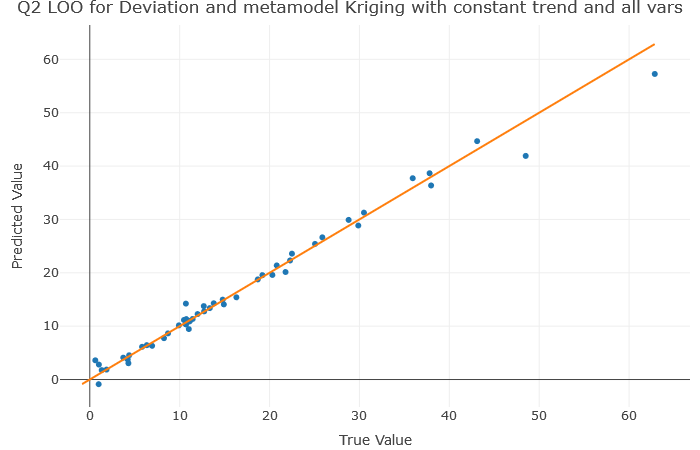
Q2Surrogate: button to display the Q2 plot
output$plotQ2final: displays the plot by calling
plotQ2final()
Plot functions
- plotQ2final(DOE, surrogatemodel, yname, ynamemenu, namesurrogatemodel, typeQ2)
Plots the predicted values by the true values to show the quality of the model. Prediction computed using the Leave-One-Out method
- Parameters:
DOE (object) – stores the point values and the DOE information (e.g. bounds…)
surrogatemodel (object) – built metamodel, contains
yname (character) – predicted variable name
ynamemenu (character) – predicted variable name processed for menus
namesurrogatemodel (character) – metamodel name
typeQ2 (character) – validation criterion name
refinesurrogate.R
source("modules/shared/dynamicSelect.R", local = TRUE)
source('modules/surrogate/surrogate_functions.R', local = TRUE)
UI and Server functions
- refinesurrogate.ui(id)
This function populates the Additional Simulations to Refine Surrogate Models panel
- Parameters:
id (character) – namespace of the module
Main reactives:
criteria: model improvement criteria
chooseY: output variable selection
nadd: number of simulations to add
generate: button to generate the simulations, calls
computeAdditionalSimulations()launch.simu: button to launch simulations if a simulator is connected to Lagun
preview.dynui: displays a preview of the generated simulations, allows to download the result
- refinesurrogate.server(input, output, session, DOE, listmodels, use_simulator, settings)
- Parameters:
input (list-like-object) – stores the widgets’ values.
output (list-like-object) – stores the instructions to build R objects in the app.
session (object) – environment that can be used to access information and functionality related to the session.
DOE (object) – stores the point values and the DOE information (e.g. bounds…)
listmodels (list) – list of trained models
use_simulator (logical) – informs if the user uses a simulator linked to Lagun
settings (list-like-object) – variables specified in settingsSurrogate.R
Main reactives:
choicesY: contains the output variables
simulations: object that stores the generated input points and the simulation information
models: contains the selected models
output$preview.dynui
download: button to download the generated input points
table: displays a preview of the generated input points
output$table: renders the generated input points as a table
output$download: creates a downloadable CSV file of the table
Main functions
- computeAdditionalSimulations(DOE, nadd, ntest, yname, models, callback)
Generates additional input points for extra simulations, in order to improve the quality of the model. This points can be used if the user is able to compute extra simulations.
- Parameters:
DOE (object) – stores the point values and the DOE information (e.g. bounds…)
nadd (numeric) – number of points to add
ntest (numeric) – number of points to test for model improvement
yname (character) – output variable name
models (list) – list of the trained models
callback (function) – reports progress
Secondary functions
- callback(a)__
Reports progress of a task. Calls R Shiny incProgress
- Parameters:
a (numeric) – ath iteration